Text in the tone of your Page
The generator's guidelines for Facebook call for a conversational, welcoming tone, texts shorter than LinkedIn's and few hashtags.
Social network
A Facebook Page is still where many people check a company's hours, address and news. SkaldPost writes posts in the right tone for the network, based on your brand's website, and publishes to your Page at the time you choose.
Welcome credits when you create your account. No credit card required.
Many companies created their Page years ago and now only look after Instagram. Facebook is forgotten, even with an audience still there.
Writing for Instagram and then adapting it for Facebook, post by post, is a chore almost nobody keeps up for long.
A caption full of hashtags and feed hooks feels off on a Page, where the conversation is usually calmer and more direct.
When a Page stops being updated, customers find old hours, expired offers and the impression that the business has closed.
Opening the Page, uploading the image and choosing the time is quick once. Doing it every week, for several posts, becomes a task you put off.
Generic posts from a phrase bank don't spark comments, and the Page loses its role as a meeting point with customers.
Skald reads the public pages and builds the profile: tone of voice, audience, products or services and content pillars. You review and correct it.
Choose Facebook as the network, on its own or together with Instagram. The text comes out in the conversational style of a Page.
Adjust the text, swap the image for one of your own, or ask for another version of the caption or artwork, with optional instructions.
Pick a date and time. With your Page connected, SkaldPost publishes at the scheduled time. Without a connection, you copy the text and download the image.
The generator's guidelines for Facebook call for a conversational, welcoming tone, texts shorter than LinkedIn's and few hashtags.
An AI-generated image to illustrate the post, or your own photo uploaded instead, so the post doesn't go out as text alone.
With the Connect Facebook and Instagram button, you choose your brand's Page without copying any token. Manual setup is still available under Advanced settings.
A post can target both networks. The AI writes one caption that works on both, and you adjust it before scheduling.
See the whole month, filter by brand and track the status of each post: suggestion, scheduled, published or failed.
If your Page isn't connected, publishing stays manual: download the image, copy the caption and post through Facebook itself.
On Instagram, the first line has to hold attention before the "more" cut-off, and hashtags help categorize the topic. On Facebook, readers are usually more willing to read flowing text, which can open with a question to invite comments and even mention your website address as a destination.
The generator guidelines reflect this: for Facebook, texts between 300 and 800 characters, a welcoming tone and zero to five hashtags. When the same post goes to both networks, the AI writes a single caption that works on both and uses a middle-ground number of hashtags. If you want very different versions, create one post for each network.
To understand the other half of this pair, see the page on AI Instagram posts.
On the Integrations screen, each brand has a Connect Facebook and Instagram button. You log in to Facebook, choose the Page and the networks SkaldPost may use, and confirm. The Page ID and token are stored encrypted, and your password never passes through SkaldPost.
To connect, your Facebook account needs permission to manage the Page. If several people look after it, check with whoever administers it which login to use. For different brands, repeat the connection for each one.
If connecting is not possible, the manual route does the job: the post is marked as manual publishing, with the image to download and the Copy caption button. An overview of all the options is in automatic posting.
A business Page works best when it mixes usefulness and closeness: notices about hours and service changes, tips related to what you sell, behind-the-scenes, questions for the community and news. Skald starts from your brand's content pillars to vary the type of post.
A calendar helps you avoid repeating topics and keep your rhythm. The content calendar shows everything planned, and the social media post scheduler explains how to set the date and time. If you prefer a ready-made template, read the guide to an Instagram content calendar, which adapts to Facebook.
Start without paying: the free plan includes welcome credits. Automatic posting to your Page is listed on paid plans, and the pricing page has the details and the credit cost of each action.
See ideas by industry for restaurants, retail stores and small business.
Illustrative examples, with fictional brands, of the conversational style Skald uses for your Page.
Loyal Friend Pet Shop
Facebook · illustrative example

Saturday grooming by appointment
Loyal Friend Pet ShopWho else has seen their dog stare at the door at walk time? Every routine has its schedule. On Saturday we have grooming by appointment. Message us to book yours.
#petshop #doggrooming
Horizon Language School
Facebook · illustrative example

New English classes start Monday
Horizon Language SchoolNew English classes start next Monday. We have morning, afternoon and evening times. Want to see the school before you decide? Drop by and chat with our team, no strings attached.
#english #languageschool
Good Price Market
Facebook · illustrative example
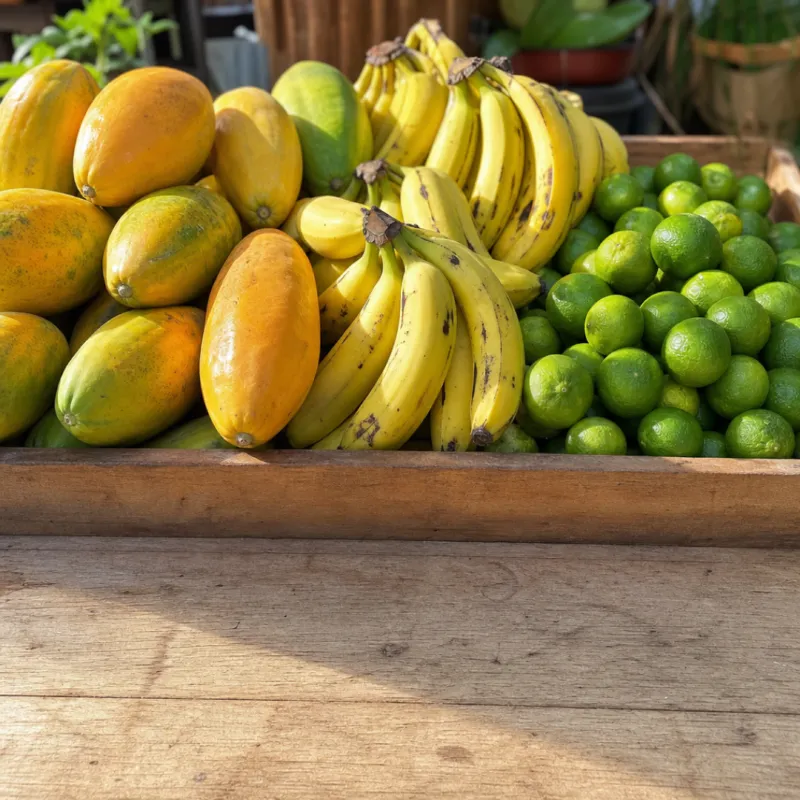
Fresh fruit arrived this morning
Good Price MarketFresh fruit arrived this morning: papaya, bananas and limes. Come take a look. We're open 7am to 8pm, Monday to Saturday. So what are you taking home?
#localmarket #freshproduce
Yes. After you connect your Page with Facebook login, SkaldPost publishes the scheduled post to your Page at the agreed time. Without a connection, you publish manually with the image and caption ready.
No. Publishing is done on Facebook Pages. Personal profiles are not part of the automatic flow.
Yes, when the post is created only for Facebook. The guidelines call for a conversational tone, medium-length text and few hashtags. If the post goes to both networks, the AI writes a single caption that works on both.
Yes. One post can target more than one network. Instagram requires an image, and for automatic publishing the account must be a professional account linked to a Facebook Page.
Yes. Every post is available for editing and preview. Skald's daily suggestions only move forward after your approval, unless you turn on automatic approval, which is off by default.
The post gets the Failed status and the error message appears on the post screen. Fix whatever is needed, such as reconnecting the Page, and schedule it again or use Publish now.
Connect your brand's networks and let SkaldPost publish at the scheduled time, with a manual fallback when you need it.
A caption with a hook, hashtags and an image for the Instagram feed, generated in your brand's voice.
Pick the day and time for each post and let SkaldPost publish at the scheduled moment.
See the whole month of posts in one place and generate a week of content with AI.
Ready-to-post content for owners who run the whole company and have no time left for social media.
Paste your brand's website address and let Skald prepare your Facebook posts. You review and schedule.